Friday, 30 September 2011

new release: experiment no.01 brushes and RAK winner Val C and t for me designs collab

Almost weekend and that means new releases!!!! I have made my first ever brush pack! Woohooo! It's a set of 10 grunge brushes that can be used for distressing or blending photos or papers, to create a photo matte or another point of interest for your background.(coloured stamps are NOT included but for preview uses only!)

20% off through the weekend at both my stores!
-- image is linked to my ZZS store --

And here's some creative inspiration.
-- layout is linked to my DSB store --
by Giny
credits: Experiment no.1, Cookie Monster (collab with Micheline Martin), Naturally and I Want Candy alpha (collab with Find Your Bliss Designs)
RAK WINNER TRAVEL NOTEBOOK BY VAL C & T FOR ME DESIGNS

I will no longer keep you all in suspense. Here's the winner of the beautiful collab Val and Terese made: the 'Travel Notebook'


1. scraplady
2. Anna
3. Lis
4. Alyna
5. suzielarose
6. Danielle
7. Gadousette
8. Ellen
9. Mary M.
10. LifeAsDINKers (Ava-J)
11. Kendra Walter
12. Lime
13. MamaB
14. Michelle Huegel

CONGRATULATIONS ELLEN!!!!!
Your coupon is already waiting in your mailbox!!!

Thanks everyone for participating! If you did not win the kit, make sure you grab it this weekend at the ZZS store with 20% discount and.....ssshhhhh....you did not  hear this from me but I would also check Val's and Terese's FB gifts this weekend!!! ;)

Tuesday, 27 September 2011

a very special RAK

Hello my friends! I am here with a very special RAK.
My dear, sweet friend and awesome designer Val has made this incredibly gorgeous collab with another ZZS team collegue: the lovely and talented miss Terese from t for me designs!

And let me emphasize the words INCREDIBLY GORGEOUS!

Unfortunately I am only allowed to show you this itsy bitsy sneak peek which of course says very little....Too little if you ask me...
So I am going to be naughty and show you one layout to give you a better idea of how much you would like to have this kit! And it gets even better! I am going to give you a chance to get yours for FREE!!! All you need to do is comment on this post and you get 1 chance to win it. Come back and post a comment with a link to your FB message about this RAK and you will entered into the draw a second time, a comment with a link to a tweet about this RAK will even get your name in three times!!!

So a comment, FB link, Tweet will give you 3 chances to win this AWESOME kit!!! Hop on over to Val's blog and you can up your chances even more!!!

I will be back this Friday around 15:00 o clock my time (see the clock in the right menu bar) to announce the lucky winner!

If you need any more convincing.....here's the layout. That says it all if you ask me!layout by Giny 

Wednesday, 14 September 2011

scoop: fall sale at zig zag scrap

September 17, 18 & 19 all products (except bundles) will be 40% off at the Zig Zag Scrap store!

We will also be releasing our new Free With every 10 dollar or more Purchase collab and there will be a new FB gift for you to find too! Want to see sneak peeks?
Here ya go!
the FWP sneak peek
And the new Facebook gift sneak peek. Make sure you grab the one that is there now, after Friday it will be GONE!
I thought I'd tell you early so you have time to go over to the shop and make your wishlists!

In the mean time you might want to have some fun with all of us in the Fun-Place and of course you shouldn't forget the 2 dollar goodies at DSB today because it's another 2 dollar deal Wednesday!

Tuesday, 13 September 2011

how to create a pencil drawing effect in photoshop

In this tutorial I will show you one way of how you can make a pencil drawing effect using adobe photoshop. I will show you step by step how I create this cool effect making use of filters and blend modes.
This is the layout I made with my pencil drawing photo.


And this is how I got there:

1. Choose a photo that you would like to look like it was drawn with a pencil.
Here's mine: a picture of my DH playing his bass guitar.

2. Next thing we need to do is turn it into a black and white image by choosing image > adjustments > desaturate (yes that is another photo in the image, a girl can change her mind, right? no need to do EVERYTHING over again...LOL)


3. Duplicate that layer by choosing layer > duplicate layer or by using the shortcut ctrl J on PC or command J on the Mac.

4. Select the top (duplicated) layer and invert it by choosing image > adjustments > invert or by using the shortcut ctrl I on PC or command I on the Mac. Your top photo layer should look something like this now. Kinda spooky huh? 

5. Now set this layer's blend mode to color dodge


 My photo looks like this now! Yup all white. Maybe yours shows a few black pixels here and there and that's okay too as long as it is not a lot! If you do have a lot of black you might have selected color burn instead of color dodge!


6. It's all going to change when we make the next step, which is choose filter > blur > gaussian blur


you will all of a sudden get something like this


Now start playing with the slider until you get the desired effect (this will be different per photo but make sure you don't exaggerate it either way, too much or too less). You will probably end up somewhere between 5 and 7.5 pixels)


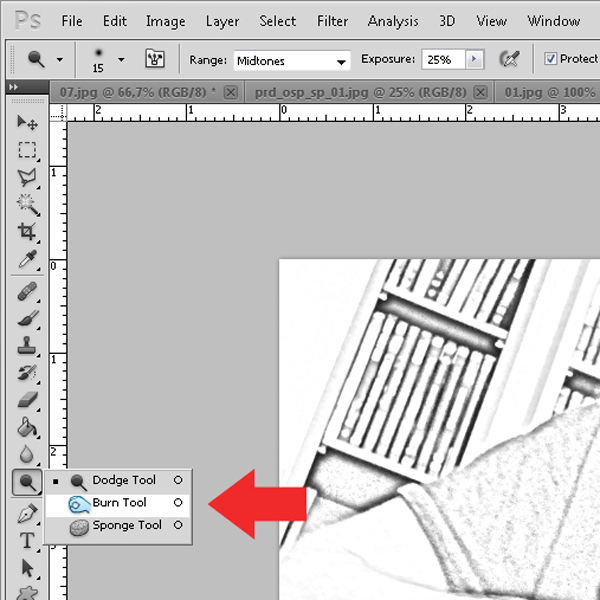
7. We already have a great result by now but maybe you want to do some more fine tuning in the contrast. I would like his hair, beard and eyes to have a bit more contrast and I don't like the grey blots on his arms. So I am using the color dodge and burn tool to fix that (color dodge to lighten up areas and burn to darken). Make sure you set the exposure to about 10% so whatever you do is subtle. Mine is still set at 25% in this image (see? on the menu bar at the top)


8. When you are satisfied then merge the two layers that you have by selecting them both and using shortcut ctrl E on PC and you guessed it, command E on the Mac. You could also go via the layers menu and choose merge layers. Whatever you prefer.  Now it's time to add a background paper and blend the 2.
I chose this paper I made for the Life is Good add-on, part of a collab I did with Val C designs because it has a nice subtle texture and because I love the ever so slightly grunged up borders.


9. Paste the paper under the pencil sketch photo then select your photo and choose blend mode multiply (you should play with other blend modes too and see what gorgeous other effects you can create!!)


That should get you something like this:


10. That brings us to the final step, just one last tweak!
Duplicate the photo layer (see step 3) and with the duplicate layer selected choose filter > other > high pass (note that this layer will also have the multiply blend mode and that okay, just leave it like that)


Adjust the slider so you will get a nice sharp effect, I set mine at 1.3


As you can see this layer is all grey and that exactly how it should be. Now change the layer's blend mode from multiply to hard light and adjust the opacity to your likings. I set it at 50 % to get this nice sharp effect and slightly more contrast but not too much. (yep it's that other photo again, but you get the point)


and this is my end picture

I hope you enjoyed the tutorial and that will be able to use this technique in your pages!

Friday, 9 September 2011

new release 'our summer picnic'

Now that the kiddies are back to school, there's finally time to start scrappin' this summer's events.
If you stayed home, like me, you probably went to the park and had a picnic at least once!
With 8 beautiful, vintage inspired, handmade, patterned papers and 5 solids in all the basic colours of the kit,
1 lower case alpha and 51 unique elements (5 of them are handdrawn and handpainted by me), this is THE kit to scrap all your summer, park and picnic pages!

It will be in the store at DSB September 9th and at ZZS on September 10th and of course the kit will be 20% off through the weekend at both my stores.

And here it is!

(image is linked to my ZZS store)

And here's a bunch of beautiful layouts to help get your creativity take flight!

((image is linked to my DSB store)

From left to right, top to bottom these works of art were made by:
Andrea, Natascha and Chantal,
Astrid, Heddy, Giny,
Chantal (yes, same one) and Salamandre, Barbara,
Dorota, Kim, Virjul,
Nini, Erika and the last one is by my hand.


buy the kit and get the dark wood alpha free with purchase 

Just in case it turns out that you weren't a coupon winner of the sneak peek RAKS on Val C's and Ana's blogs.....don't be sad, because there's still a prize for you!
Every customer that buys 'Our Summer Picnic' at my Zig Zag Scrap store will receive this gorgeous wooden alpha, shown below, FREE WITH PURCHASE!!
You will not be able to find the alpha in the store though!
What you need to do is add the kit to your cart and go through checkout!!!
It will magically appear in your cart all by itself!

Offer stands from 10 through 17 September


Wishing you a wonderful weekend and Happy Scrapping!

Tuesday, 6 September 2011

are you in for a celebration? well then join us at DSB!

We are celebrating Brazilian Independance Day and you are ALL invited!
Put on your party hat and hop on over to the store by clicking the image below!
Have Fun!!!!

Friday, 2 September 2011

new collab and add-on freebie!

Squeeeeeee....I have teamed up again with Micheline Martin and I love how our kit turned out!!! So cute you will not be able to resist it!

We made it for all those little and big cookie monsters out there! If it isn't you then I am sure it is someone you know very well!
The 17 handmade, softly textured papers, lower case cookie alpha and 52 of the cutest elements you have ever seen are all there just to help you capture them all in the act!!!

And tatadada!.......here it is
Like always new releases are 20% off!
(image is linked to my ZZS store)
my personal CT and the teams of DSB and ZZS had a blast playing with it.
Look at all the beautiful and fun pages they made!
(image is linked to my DSB store)

these beauties are made by (from left to right and top to bottom:
Barbara, Chantalk, Virjul
Dalis, Renate, Elker
Katja, Cheryl, Giny
Ana, Nini, Marleen
 Suzanne, Melanie, Ana
Dorota, Chantal, Erika,
Erika, Salamandre

Make sure to grab this add-on to even further complete the kit! Have a great weekend and Happy Scrappin'!

 (just click on the image to download)